hanyangl5
Profile GPU Counters without SnapdragonProfiler & Streamline
In game performance analysis, GPU counters are one of the most valuable data sources.
The common problem is tooling lock-in: once a workflow depends on vendor-specific tools, cross-SoC analysis becomes painful.
This post focuses on one practical question:
Can we profile GPU counters with Perfetto only, without relying on SnapdragonProfiler or Streamline?
My short answer: yes. It works on both QCOM and Mali, and it is production-friendly.
Background and Motivation
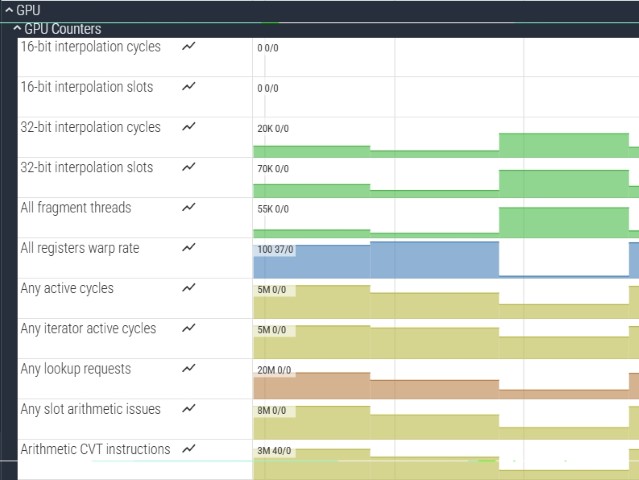
Arm is relatively open about GPU counters, libGPUCounters is open-source, and Perfetto can collect mali_gpu_counters directly.
While testing Qualcomm sdpcli, I noticed two signals:
sdpclioutputs data compatible with Perfetto trace format- one error stack pointed to
perfetto.cc
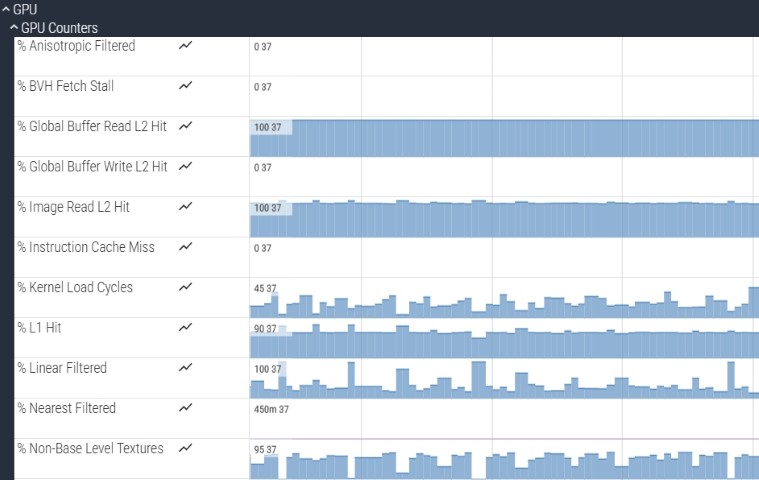
Based on that, I tested a Perfetto-based pipeline for Snapdragon GPU counters and successfully captured usable counter data.
GPU Counter Configuration
-
Mali
In Perfetto UI, enablemali_gpu_countersand use the predefined counter IDs for direct analysis. -
QCOM
QCOM counter IDs are not fully public. In practice, expanding the ID range (for example,0-200) usually exposes key metrics such asread total / write total.
Output
QCOM
Mali
GPU-related Queries (Copy and Run)
QCOM GPU Bandwidth (MB/s)
SELECT id, name, avg(value)/1048576 AS avg_mb_s
FROM Counters
WHERE name LIKE '%read total%' OR name LIKE '%write total%'
GROUP BY name;
Mali GPU Bandwidth (MB/s, normalized by trace duration)
WITH duration AS (
  SELECT (max(ts) - min(ts))/1e9 AS duration_sec
  FROM counter
),
bw AS (
  SELECT ct.name AS name, sum(c.value) AS total_bytes
  FROM counter c
  JOIN counter_track ct ON c.track_id = ct.id
  WHERE ct.name LIKE '%external read bytes%' OR ct.name LIKE '%external write bytes%'
  GROUP BY ct.name
)
SELECT
  name,
  total_bytes/1024.0/1024.0/(SELECT duration_sec FROM duration) AS avg_mb_s
FROM bw;
Current (mA)
For current measurement, wireless debugging is recommended to avoid USB power path interference.
SELECT id, name, avg(value)/1000 AS avg_ma
FROM Counters
WHERE name LIKE '%batt%' OR name LIKE '%current_ua%'
GROUP BY name
ORDER BY avg_ma DESC;
Tips
- Use the Trace Processor Python API to build an automated profiling pipeline.
- Some devices and metrics may require root access.